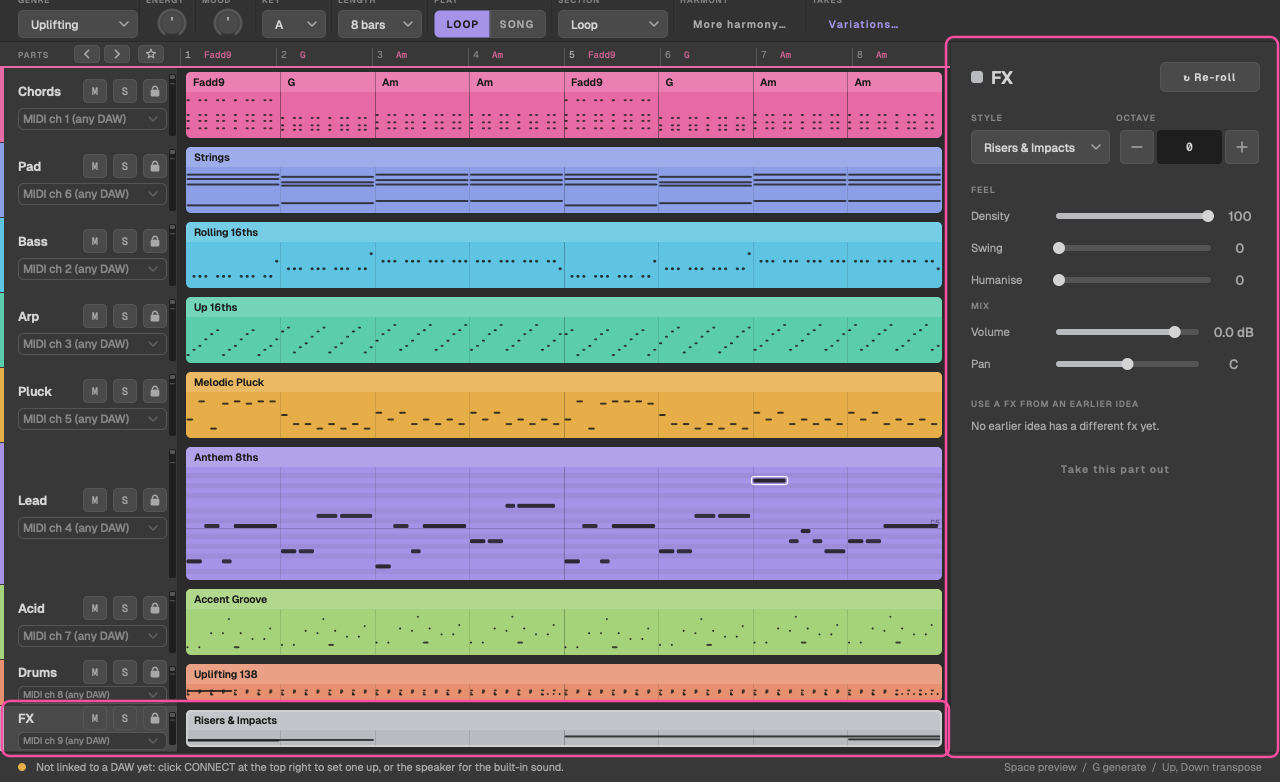
The nine parts
Every part TranceTools can write, the styles each one plays, its built-in sounds and the MIDI channel it uses.
At a glance
Each part has a style: the pattern it plays. Pick one from the part's Style menu in the inspector (Pro); the lane shows it in Simple. A style you pick yourself stays when you generate; otherwise, the genre picks styles that suit it.
| Part | MIDI channel | Styles | Built-in sounds |
|---|---|---|---|
| Chords | 1 | 8 | Supersaw, Stab, Piano, Organ |
| Bass | 2 | 9 | Saw, Sub, Reese, Pluck |
| Arp | 3 | 10 | Pluck, Bell, Saw, FM |
| Lead | 4 | 8 | Supersaw, Pluck lead, Soft square, Screamer |
| Pluck | 5 | 8 | Classic, Marimba, Pizz, Harp |
| Pad | 6 | 8 | Warm, Strings, Choir, Glass |
| Acid | 7 | 8 | 303, Squelch, Rubber, Distorted |
| Drums | 8 (10 in exported files) | 8 | Kits: 909, 808, Hard, Psy |
| FX | 9 | 1 | One FX sound |
Settings every part has
- Style: the pattern. Changing it writes a new version of the part in that style.
- Octave: moves just this part up or down. The shift stays when you generate new ideas.
- Re-roll: a new version in the same style.
- Lock, Mute and Solo, on the lane.
- Feel: see Feel.
- Sound and Mix: see Sounds and audio output.
- Where it plays, under the part's name in its lane: the DAW track or MIDI channel. See Where each part plays.
Add a part from the bar under the lanes (+ PAD, + ACID and so on, or ADD ALL); it's written to fit the parts already there. Take one out with the remove button at the foot of the inspector.
Chords
The rhythmic chord part: the supersaw stabs, gates and anthems that carry the harmony. Its colour (triads, 7ths, add9, sus2 or sus4) comes from Chord colour in More harmony, and its spacing from Voicing.
Styles: Sustained Supersaw, Offbeat Stabs, Gated 16ths, Sus2 Supersaw, Syncopated Stabs, Half-Bar Pumps, Rolling 8ths, Anthem Quarters.
Pad
The held, slow-moving bed under everything. In an Uplifting breakdown it swells in over the first half. Chords is the rhythmic part; Pad is the soft background layer. Both play the same progression.
Styles: Warm Pad, Strings, Soft Swell, Airy High, Open Fifths, Half-Bar Swells, Moving Inner Voice, Drone.
Bass
The bassline, following the chord roots (or holding the key's root, with the bass pedal on). Bass notes stay clear of the kick.
Styles: Offbeat 8ths, Rolling 16ths, Octave Gallop, Sustained Sub, Psy Pedal, Gallop, Walking Offbeat, Driving 8ths, Syncopated Sub.
Read more about the patterns in Trance basslines.
Arp
An arpeggio through the notes of each chord.
Styles: Up 16ths, Up / Down, Trance Gate, Random Tones, Down 16ths, Triplet Up, Octave Pulse, Broken Chord, Pedal Arp, 8ths Up.
Pluck
Short, bright melodic notes: the rhythmic hook of progressive and the counter-melody of uplifting.
Styles: Rhythmic Plucks, Melodic Pluck, Offbeat Plucks, Pluck Sequence, Echo Plucks, Broken Chords, Pizzicato, Bounce.
Lead
The main melody, written as a riff: a few notes a bar at most, with offbeats and notes tied over the beat, and a held note or a gap every two bars. The riff is built on a chord tone, a 4th or 5th above it, the octave or a neighbouring note, and it moves by repeats and leaps rather than wandering up and down the scale.
The riff comes back almost unchanged: notes that still fit the new chord stay, and only those that don't are bent to fit. The line reaches its peak, one high note, by a leap.
In the drop, the second half lifts the lead higher than the first.
Styles: Anthem 8ths, Syncopated, Long Notes, Call & Response, Hook 16ths, Breakdown Melody, Riser Motif, Offbeat Hook.
Peak bar
In the inspector, Peak bar chooses the bar the peak note lands in, or Auto (late in the answer). Bars that end a phrase can't hold the peak. You can also right-click a bar for Peak Note in Bar, or right-click a note for Make This the Peak.
Your own melody
You can give TranceTools a one- or two-bar melody and let it write the lead from it. See Continue a melody.
Acid
A 303-style line with accents and slides. Slides are written as overlapping notes, so a mono synth with legato glide plays them as slides.
Styles: Classic 303, Rolling Acid, Squelch Offbeat, Acid Riff, Slide Melody, Psy Acid, Hypnotic, Accent Groove.
More in Acid in trance.
Drums
A full kit, written as General MIDI drum notes, with a fill every four bars.
Styles: Four on the Floor, Uplifting 138, Rolling Psy, Progressive Groove, Tech Trance, Hard Trance, Breakbeat, Minimal Pulse.
| Sound | MIDI note |
|---|---|
| Kick | 36 (C1) |
| Snare | 38 |
| Clap | 39 |
| Closed hat | 42 |
| Open hat | 46 |
| Crash | 49 |
| Ride | 51 |
Toms and percussion use their General MIDI notes too. Drums preview on MIDI channel 8 and are written on channel 10 in multi-track MIDI files, as General MIDI expects. Transposing the idea never moves the drum notes.
In Bitwig, the drums preview on a reference track the script adds, TranceTools Drums, with Bitwig's 909 kit, because Bitwig's kits don't use the General MIDI layout. What you drag or export is still General MIDI. Pick your own track from the menu under Drums in its lane to hear your kit instead.
FX
Transition effects: risers of 1, 2, 4 or 8 bars, impacts, downlifters, a reverse cymbal and long intro sweeps. Each effect is one note on MIDI channel 9; the built-in sound shapes it to the right length at your tempo.
- In the Song, FX are always on, and each section gets its own: a sweep in the intro, an impact and downlifter into the breakdown and outro, a riser and reverse cymbal through the build, and a hit on each pass of the drop. The FX lane shows in the Song even if you haven't added it.
- In the loop, FX are off until you add them with + FX or ADD ALL.
FX have one style (Risers & Impacts) and one sound, and no octave, pump or Mutate. Transposing and the last-drop key lift leave them alone.