Generating ideas
How TranceTools writes ideas, how to steer it, how to keep what you like, and how to find an idea again later.
What an idea is
An idea is a loop of 4, 8 or 16 bars in one key and tempo, over one chord progression, with up to nine parts: Chords, Pad, Bass, Arp, Pluck, Lead, Acid, Drums and FX. Every part is written to agree with the chords and with each other.
The same idea can also play as a whole song, with an intro, breakdown, build, drop and outro made from it. See Sections and the song timeline.
Genres
Choosing a genre sets the tempo (when no DAW is linked), scale, progression, chord colour, and every unlocked part's style and feel, then writes a fresh idea. Each genre rolls from its own pool of fitting styles, progressions and tempos, so two Uplifting ideas won't sound the same.
| Genre | Tempo | Starts in | Chord colour |
|---|---|---|---|
| Uplifting | 136–140 BPM | Minor | Lift |
| Progressive | 128–132 BPM | Minor | 7ths |
| Psy | 140–146 BPM | Phrygian | Triads |
| Tech | 136–140 BPM | Minor | Sus2 |
| Vocal | 132–136 BPM | Minor | Add9 |
| Hard Trance | 148–155 BPM | Harmonic minor | Triads |
| Classic 90s | 134–140 BPM | Minor | Triads |
Surprise me, on the launch screen, rolls the dice on everything.
Choose a genre from the chips (Simple), the Genre menu (Pro), Idea > Genre, or the launch screen.
Recipes
Every genre rolls from its own recipes: curated sets of styles that belong together, so each new idea sounds like the genre. Each genre also leaves out a part or two to start with (add them back from the bar under the lanes), and most keep one moving line in the drop.
| Genre | Built around | Starts without |
|---|---|---|
| Uplifting | A rolling or galloping bass, gated or pumping supersaw chords, the anthem lead, strings or a warm pad, and an arp or pluck | Acid |
| Progressive | A driving bass, stabs that leave space, a slow-moving pad and a lead of few notes | Acid |
| Psy | The kick and a rolling bass, an acid line, a gated arp, a riff and a drone | Chords and Pluck |
| Tech | Percussive stabs, a hard bass, an acid riff and a pluck sequence over an open fifth or drone | Arp |
| Vocal | Pumping chords under a warm pad or strings, and a lead that leaves room for a vocal | Acid |
| Hard Trance | A hard kick, an offbeat or driving bass, pumping supersaw chords, the hoover or anthem lead, and strings | Acid and Pluck |
| Classic 90s | Offbeat stabs, an offbeat bass, plucky arps, a simple riff and a gated pad over a 909 | Acid |
Uplifting also uses the Lift chord colour.
Energy and Mood
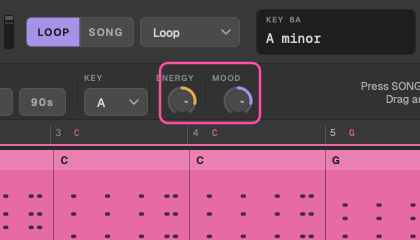
Two knobs next to the genre. The middle of each is the genre's own sound; double-click a knob to go back there. Turning one reshapes the idea when you let go, and you can undo it. Locked parts don't change, and Generate rolls around wherever the knobs sit.
Energy: sparse to busy
- Bass, arp and acid settle into 8ths at the low end and fill their 16ths at the high end (the bass rolls, but never on the kick).
- Plucks thin out as energy drops.
- Chords hold at the low end and gate harder at the high end.
- The drums lose percussion and fast hats at the low end, and gain off-beat open hats, tambourine and fills at the high end.
Energy re-rolls the rhythm parts over the same chords.
Mood: dark to euphoric
- Generated progressions come from the ones that lean that way: darker moods favour minor and Phrygian colours, euphoric ones the classic lifts.
- Dark rolls sometimes go Phrygian.
- Euphoric chords take add9; dark ones go back to plain triads.
- The lead's register and note choice follow: dark leads sit on the root and fifth, euphoric ones reach for the 3rd and 9th.
With the chords (or any part) locked, Mood keeps the progression.
Generate and New Chords
Generate (G or R) writes a new idea for every part you haven't locked, in the current genre, key, Energy and Mood. Unless the chords are locked, it writes a new progression too.
New Chords Pro only writes just a new progression; the unlocked parts are rewritten to follow it.
Generate everything and Surprise me
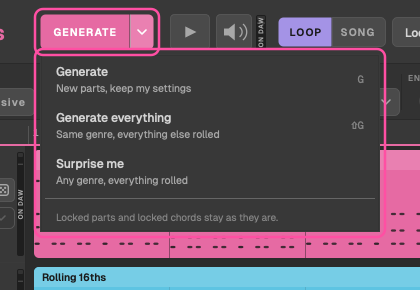
The small ▾ beside Generate opens three ways to roll:
- Generate (G): new parts, keeping your settings.
- Generate everything (⇧ G): the same genre, with everything else rolled: the key, the tempo (unless your DAW sets it), the chords, Energy, Mood, the last drop's lift, and each unlocked part's style and feel.
- Surprise me: any genre, with everything rolled.
Everything stays inside what suits the genre, so a roll always sounds like it. In Simple, Generate everything keeps the genre's own scale and leaves your voicing and sounds alone. In Pro it can also pick another scale that suits the genre, and it sets the voicing and sounds back to the genre's.
Locks still win: locked parts stay as they are, and Lock Chords keeps the key, scale and chords. The status bar says what was rolled, for example Everything rolled: Uplifting, F minor, 138 BPM. Each roll is one step in the history, so ⌘ Z takes you straight back.
Locking
- Lock Chords (L) keeps the progression everywhere: Generate, Energy, Mood and the song sections all keep it.
- Lock a part with the lock on its lane. Generate leaves it exactly as it is, and new parts are written around it.
A typical way to work: generate until the chords grab you, lock them, generate until you get a lead you like, lock it, then re-roll the bass and arp until they fit.
Re-rolling
A part
The re-roll button on a lane (Simple) or in the inspector (Pro) writes a new version of just that part, in its current style.
A bar or a range
Right-click a bar in a lane and choose Re-roll Bar. Shift-drag across bars to choose a range, then re-roll it in that part or in every unlocked part. The rest of the lane stays as it was.
Mutate Pro only
In the inspector, Mutate 25% changes about a quarter of the part's notes and Mutate 50% about half, keeping the hook and rhythm. Use it when a part is nearly right. The kick never moves.
History, undo and redo
Every new idea and every change is a step in the history: a re-roll, a new style, a part's feel, voicing, sound, volume, pan or octave, a lock, the Song's arrangement and its last-drop lift. Dragging a fader or slider counts as one step, however far you drag it.
- ⌘ Z and ⇧ ⌘ Z, or Idea > Undo and Redo, step back and forward.
- In Pro, the < and > arrows above the lanes, or ← and →, do the same.
Use a part from an earlier idea
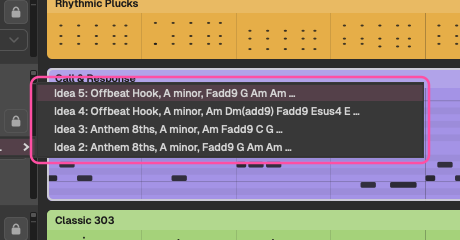
Right-click a lane (or its header) and choose Use [Part] From…. The menu lists the last ten ideas in the history with a different version of that part, by idea number, style, key and chords. Pick one and its notes are copied into this idea, moved to this key and these chords, and the part is locked so Generate keeps it. A part from a shorter idea repeats to fill the loop.
In Pro, the inspector also shows the last four earlier versions of the part, with Use From. ⌘ Z undoes it, lock and all.
Saving ideas
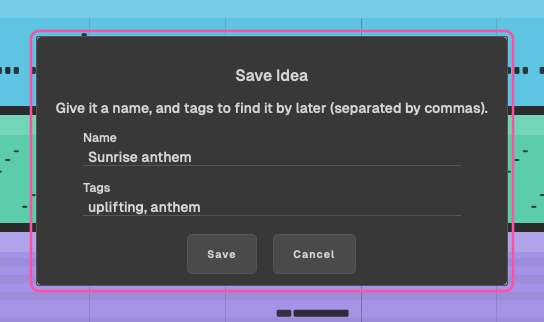
File > Save Idea… (⌘ S) saves the idea you're on. It suggests a name (its chords and key) and a tag (its genre); change either, add more tags, and save. Saving the same name twice keeps both.
Saved ideas are shared by the app and the plugin, in every DAW. See where your files live.
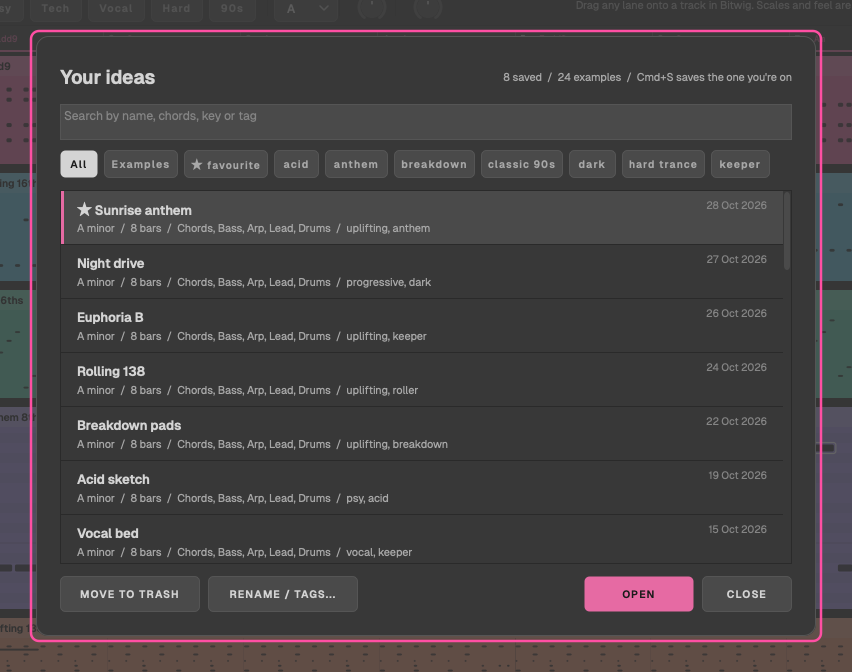
The idea browser
File > Open Idea… (⌘ O), or Your ideas on the launch screen, lists your saved ideas, newest first, then the built-in examples.
- Search by name, chords, key or tag.
- Filter by tag.
- Open an idea. It becomes a step in the history, so ⌘ Z takes you back to what you had.
- Rename or retag it.
- Move it to the Trash. It goes to the Mac's Trash, so you can get it back from there.
A saved idea keeps its Song too: a changed arrangement and the last drop's lift come back when you open it.
If a saved idea can't be read, it's listed under the Open Idea card with a note, and the file is left untouched.
Example ideas
TranceTools comes with 24 example ideas, three or more in each genre, to hear what it can do and to start from. They're listed in the idea browser after your own ideas, marked EXAMPLE, and the Examples chip shows just them. Until you've saved an idea of your own, the launch screen's card says Example ideas and the browser opens on them.
| Genre | Examples |
|---|---|
| Uplifting | Paper Dawn, Borrowed Sun, Gallop Home, Late Answer, Long Way Up, Glass Skyline |
| Progressive | Motorway Glow, Low Ember, Amber Hour |
| Psy | Phrygian Engine, Copper Gate, Bent Mirror |
| Tech | Steel Thread, Square Tide, Quiet Circuit |
| Vocal | Held Breath, Window Lights, Kept Promise |
| Hard Trance | Iron Wings, Red Gauge, Pressure Front |
| Classic 90s | Pizzicato '97, Chalk Blue, Sunday Warehouse |
An example opens with its genre, its feel and its Song, and works in Simple as well as Pro. Examples are built into TranceTools, so they can't be renamed, retagged or moved to the Trash. Change anything you like, then press ⌘ S: it saves your own copy, named after the example (with (edit) once you've changed it), and the example stays as it was.
Favourites
Favourites are saved ideas with the tag "favourite". In Pro, the star by the history arrows adds or removes it; an idea saved only by the star goes when you unstar it. File > Favourites lists them, and filtering the idea browser by "favourite" does the same.
Favourites from the beta are brought across once, with their names and dates.
Blank canvas
File > New Blank Canvas (⌘ N) keeps the key, writes a fresh progression and takes every part out. Add the parts you want from the bar under the lanes, one at a time, or ADD ALL. Each new part is written to fit what's already there.
The variation grid Pro only
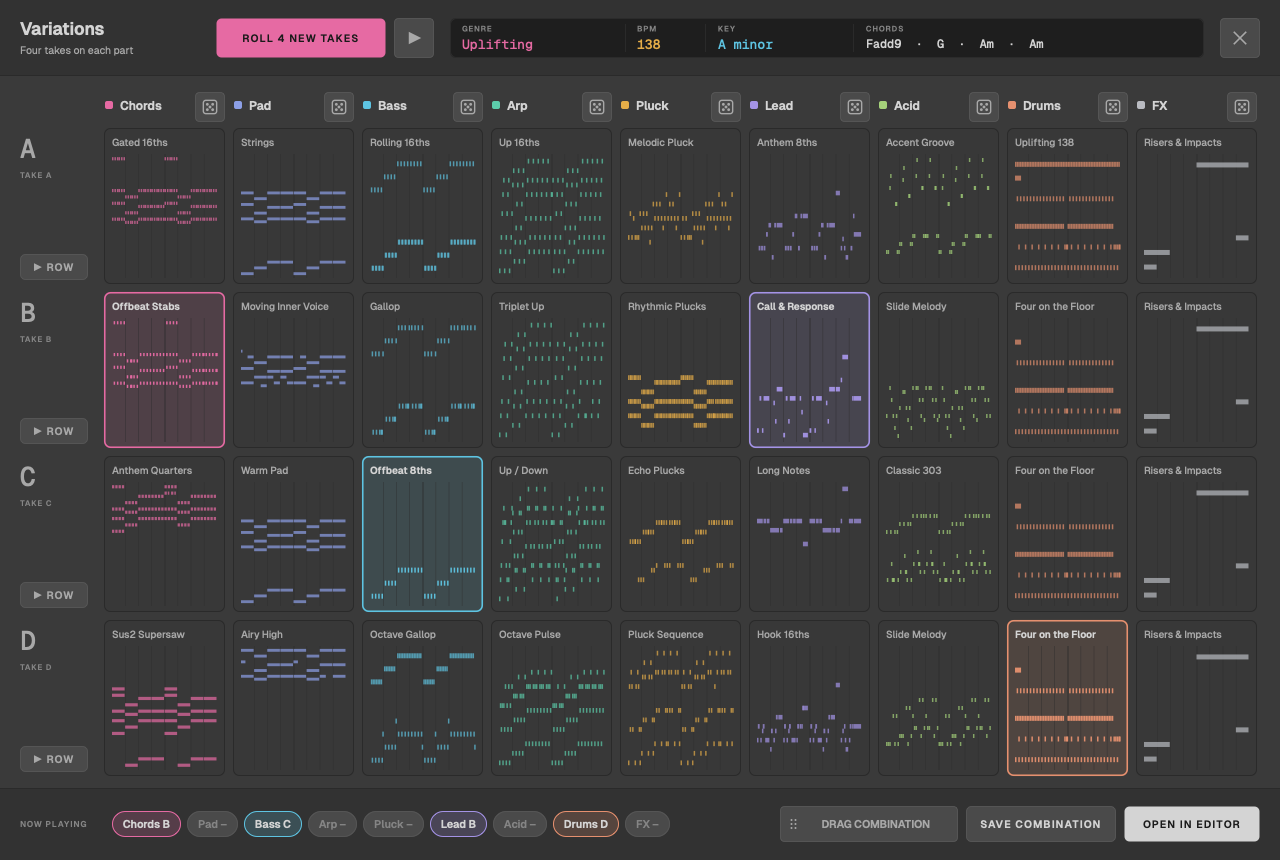
View > Variations, or Variations… next to More harmony, opens the grid over the editor: a column per part, each with four takes (A to D) drawn as small piano rolls and labelled with their style.
- Click a take in each column to build a combination, and Play to hear it. While it's playing, a switch waits for the next bar line, so it never stumbles.
- Play Row hears a whole row of takes. NOW PLAYING chips show what you're hearing.
- Each column has a re-roll; ROLL 4 NEW TAKES rolls them all.
- Open in Editor makes the combination the idea, as one step you can undo. Save Combination saves it, and Drag Combination drags it straight into your DAW.
In Simple, the menu item shows as Variations (Pro).