Feel: groove, gates and pump
Feel changes how a part plays, not what it plays. Move a slider and the notes stay the same; only their timing, velocity, length or octave changes.
About Feel Pro only
Each part has its own Feel, in the inspector. Feel sits on top of the idea, so moving a slider never re-rolls the notes, and you can always set it back. Choosing a genre sets each part's feel to suit it.
Feel travels with the part: you hear it in the preview, and it's in the MIDI when you drag or export.
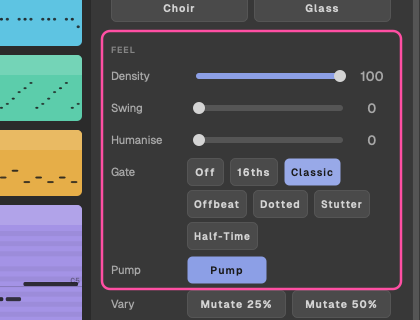
Density
Thins out the off-beat notes. At full density, every note plays; turn it down and fewer off-beat notes are kept (down to a quarter of them), while the notes on the beat stay. Use it to make a busy part sit back.
Swing
Pushes every other 16th late, up to half a 16th. A little swing gives arps, plucks and hats a rolling groove; a lot sounds shuffled.
Humanise
Adds small changes to velocity and timing, so a part sounds played rather than programmed.
Range
For Arp, Lead, Pluck and Acid. Three settings:
- Narrow: folds the line into one octave.
- As written.
- Wide: lifts every other bar an octave.
Trance gate
For Chords, Pad, Lead and Pluck. A trance gate chops held notes into a 16th-note pattern, the classic stuttering supersaw. Choose a pattern:
- Off
- 16ths
- Classic
- Offbeat
- Dotted
- Stutter
- Half-Time
The gate is written into the notes, so it comes with the part when you drag it into your DAW. For more on gates, and how to build your own, see Trancegate settings explained and the free Gate Builder.
Pump
A sidechain-style duck on every beat, written as volume automation (CC 11), so the part breathes with the kick. It's available on every pitched part (not Drums or FX).
The pump comes with the part when you drag it. If your synth doesn't respond, map CC 11 (expression) in it. When the preview stops, CC 11 goes back to 127.
For the real thing in your mix, see Sidechain settings for trance.
Tip: the built-in sound also has a sidechain pump of its own, keyed to the kick, with a depth set by the genre. It's separate from this Pump switch, which writes CC 11 into the MIDI, so your own synths can pump too. In the built-in sound you hear both, so for a gentler pump on a part, leave this switch off. See A sound that breathes.