Docs · Reference manual
Menus and shortcuts
Every keyboard shortcut and menu item in TranceTools, with links to where each one is explained.
Keyboard shortcuts
These work in the app and in the plugin window (when it has the keyboard focus).
Playing and generating
| Keys | What it does |
|---|---|
| Space | Play or stop the preview |
| G or R | Generate: a new idea for every unlocked part |
| ⇧ G | Generate everything: the same genre, with the key, tempo, chords, Energy, Mood and styles rolled too |
| L | Lock or unlock the chords |
| ↑ ↓ | Transpose the idea up or down a semitone |
| Return | On the launch screen: Make me a trance idea |
| Esc | Close the launch screen |
History and files
| Keys | What it does |
|---|---|
| ⌘ Z | Undo: the previous idea or change |
| ⇧ ⌘ Z | Redo |
| ← → | Step back and forward through the history |
| ⌘ S | Save Idea |
| ⌘ O | Open Idea (the idea browser) |
| ⌘ N | New Blank Canvas |
Help
| Keys | What it does |
|---|---|
| ? | Show or hide the help overlay |
Mouse
| Action | What it does |
|---|---|
| Drag a lane | Drop the part into your DAW as a MIDI clip |
| ⇧ drag across bars | Choose a range of bars to re-roll |
| Click a note | Delete it |
| Click a chord on the ruler | Change it |
| Double-click a knob or slider | Reset it (Energy, Mood, volume, pan) |
| Right-click the speaker | Audio Output (app) |
File menu
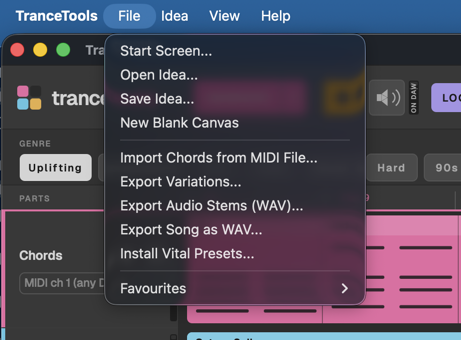
- Start Screen…: the launch screen.
- Open Idea… (⌘O) and Save Idea… (⌘S). See Saving ideas.
- New Blank Canvas (⌘N). See Blank canvas.
- Import Chords from MIDI File…. See Importing chords.
- Export Variations…, Export Audio Stems (WAV)… and Export Song as WAV…. See Dragging and exporting.
- Install Vital Presets…. See The Vital preset pack.
- Favourites: save or remove this idea, and your favourites, newest first.
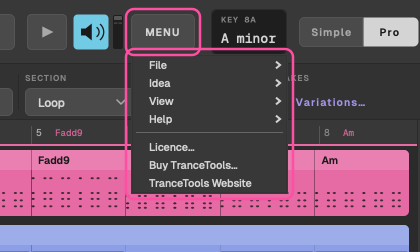
The plugin's MENU Plugin only
The plugin has no menu bar, so the MENU button holds the File, Idea and View menus above, plus Licence…, Buy TranceTools… and TranceTools Website. It also gets a Help submenu for the help overlay and tips.