Licence, updates and your files
How activation works, how to move to a new Mac, how updates arrive, where TranceTools keeps your ideas and settings, and what a crash report sends.
Activation
TranceTools is £29 one-off (£19 until 31 December 2026), with every 1.x update free and a 14-day refund. When you buy, you get a product key by email.
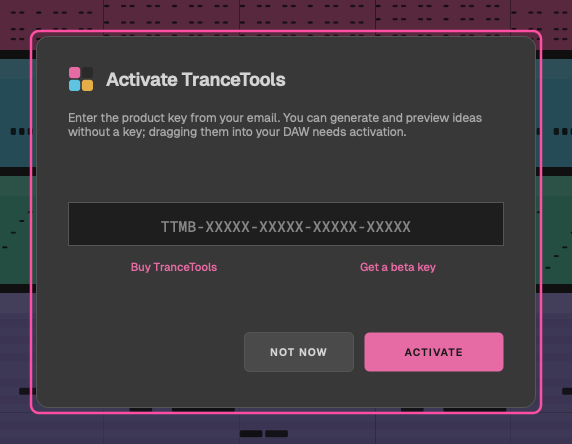
- Click ACTIVATE in the top bar, or choose TranceTools > Licence… (in the plugin, MENU > Licence…).
- Paste your product key and click ACTIVATE.
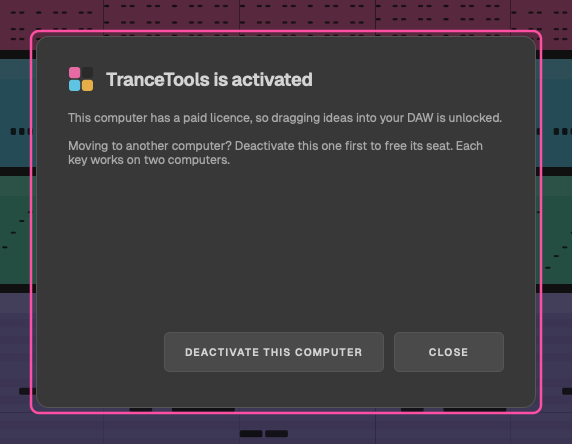
Activating needs an internet connection. Once activated, the licence button shows your licence instead of ACTIVATE, and dragging and exporting are unlocked. The app and the plugin share the licence, in every DAW, so you only activate once per Mac.
Without a key
You can generate ideas and hear them without activating. Dragging into your DAW and exporting files need a key. The status bar says Preview mode until you activate.
Two Macs per key
Each key works on two computers. Moving to a new Mac? Open the licence panel on the old one and click DEACTIVATE THIS COMPUTER to free its seat, then activate the new one.
Working offline
TranceTools checks your licence with trancetools.com from time to time (about every two weeks) when you're online. It keeps working offline for 30 days. After that, the panel says Re-check your licence: connect to the internet and click CHECK AGAIN to carry on dragging.
Beta keys
Beta keys keep working until the end of Tuesday 8 December 2026, a week after launch, and don't carry over to 1.0. After that, use the tester code from your email or buy a licence. Once the beta has ended, activating or re-checking a beta key says The beta has ended. Thanks for testing!, with a link to buy TranceTools. Beta testers get an email about 1.0 when sales open.
Updates
The app checks for updates once a day and offers to install them. Choose TranceTools > Check for Updates… to check now. Updating the app updates the plugin too.
Where your files live
TranceTools keeps everything in your user Library. To open it in the Finder, choose Go > Go to Folder… and paste the path.
| What | Where |
|---|---|
| Saved ideas (.ttidea files) | ~/Library/TranceTools/Ideas |
| Your licence | ~/Library/TranceTools/licence.txt |
| Preferences shared by the app and plugin (Simple/Pro, audio output, crash reports, tips) | ~/Library/TranceTools/Preferences.settings |
| The app's log | ~/Library/TranceTools/Logs/TranceTools.log |
| The app's last session | ~/Library/Application Support/TranceTools/TranceTools.settings |
| The plugin | ~/Library/Audio/Plug-Ins/VST3/TranceTools.vst3 and ~/Library/Audio/Plug-Ins/Components/TranceTools.component |
| Bitwig script | ~/Documents/Bitwig Studio/Controller Scripts/TranceTools |
| Ableton Live script | Your Live User Library, in Remote Scripts/TranceTools |
| Vital presets, once installed | Vital's presets folder (usually ~/Music/Vital), in TranceTools |
The plugin's idea is saved inside your DAW project, not in these folders. Saved ideas are shared by the app and the plugin, even in GarageBand.
Tip: to back up your ideas, copy the Ideas folder. To move them to another Mac, copy it into the same place there.
If the app's settings can't be read, TranceTools keeps a copy called TranceTools (unreadable).settings, starts fresh, and tells you. Saved ideas that can't be read are listed under the Open Idea card and left alone.
Crash reports
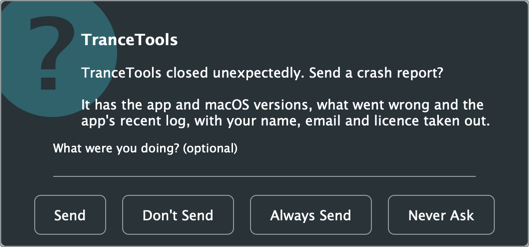
If the app ever closes unexpectedly, the next time you open it, it asks: TranceTools closed unexpectedly. Send a crash report? You can add a note, and choose:
- Send: send this one.
- Don't Send: not this time.
- Always Send: send future reports without asking.
- Never Ask: never ask, never send.
Nothing is ever sent unless you say so. Change your choice any time in Help > Crash Reports: Ask After a Crash, Always Send or Never Send.
What a report contains
The app version and build, your macOS version and Mac type, the crash details, the last lines of the app's log, and your note if you wrote one. Before anything is sent, your user name and full name, email addresses, licence keys and similar details are taken out.
Crash reports come from the app only. In a DAW, a crash could be the DAW's or another plugin's, so the plugin doesn't catch them.
A report that can't be sent (because you're offline, say) is kept and tried once more at the next launch, and the status bar tells you either way.
Feedback
Help > Send Feedback… opens our feedback form with your TranceTools version, macOS and DAW already filled in. You can also email hello@trancetools.com.