Bitwig Studio
Automatic- Open Bitwig. TranceTools installs its controller script for you.
- Pick a Bitwig track for each part and press Preview.
A Mac app that sits next to your DAW. Roll a full trance idea (chords, pad, bass, arp, pluck, lead and acid), hear it on the synths already in your project, then drag the parts straight in as MIDI clips. Deepest with Bitwig Studio and Ableton Live; previews in any DAW.
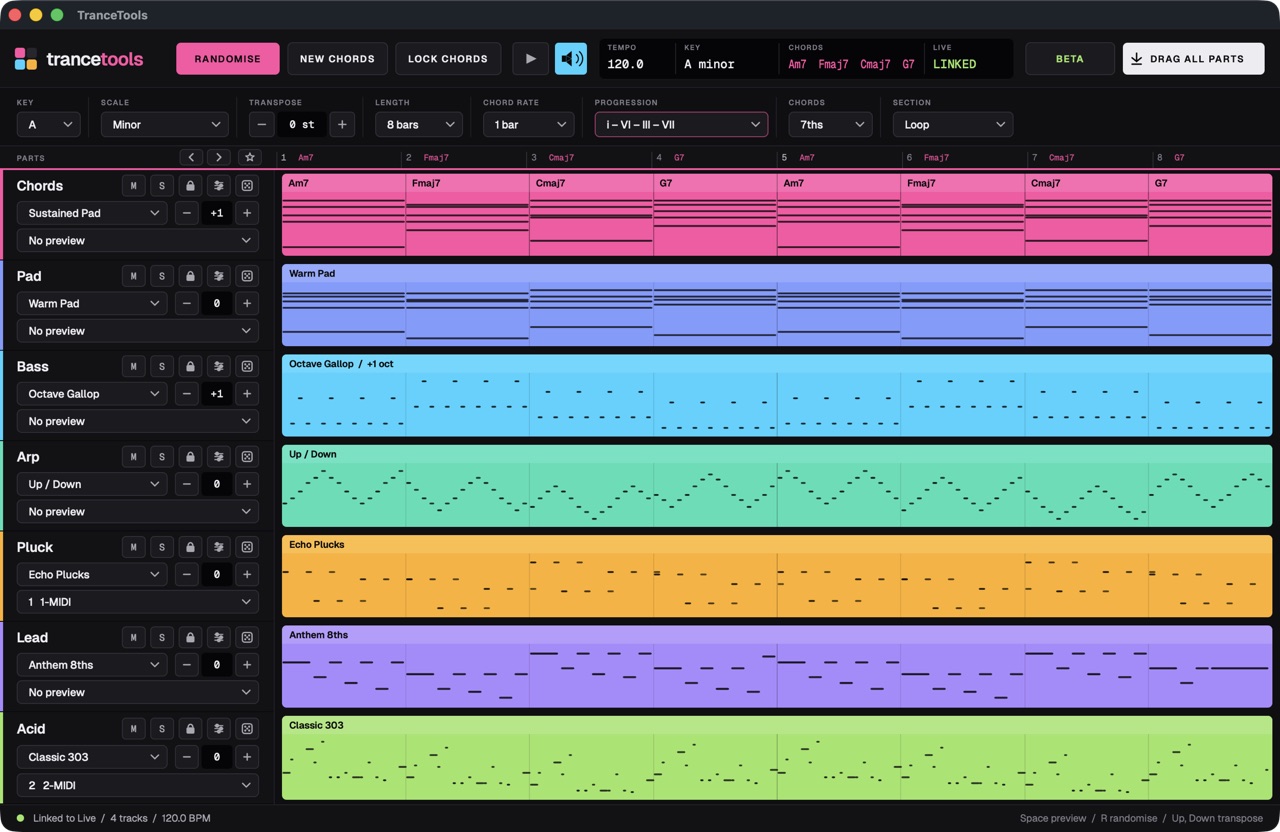
Chords, Pad, Bass, Arp, Pluck, Lead and Acid, each with 8 to 10 styles: psy and gallop basses, triplet arps, hook leads, drone pads and 303 lines with accents and slides. Randomise the lot, or re-roll, lock, mute and solo each part.
Start from classic trance progressions shown in Roman numerals, colour the chords with 7ths, add9, sus2 or sus4, and click any chord on the ruler to change it.
Import any MIDI file and TranceTools finds the key and chords, then writes new parts over them.
Density, Swing, Humanise and Range on every part change how it plays while keeping the notes you liked.
Write a Breakdown, Build or Drop, or a full 24-bar song, in minor, harmonic minor, Phrygian, Dorian, major, Mixolydian or Lydian.
Pick a track in Bitwig or Live for each part and hear the idea on your own sounds. In any other DAW, play it through TranceTools' MIDI output, one channel per part, or use the built-in preview synth.
Drop any part, or all seven, onto a track as a plain MIDI clip. Or export 8, 16 or 32 variations as multi-track MIDI files in one go.
Step back and forward through your last 100 ideas, and star the keepers as favourites.
Install. Open the download, drag TranceTools to Applications, and open it.
Or skip setup and hear ideas on the built-in preview synth.
Nothing during the beta. After the beta it will be a one-off purchase of £29 ($35 or €35), with no subscription and every 1.x update included. Beta testers get it for less, and anyone who sends useful feedback gets it free.
A Mac running macOS 11 Big Sur or later, with Apple silicon or an Intel processor. It links most closely with Bitwig Studio and Ableton Live 10, 11 or 12 (Intro, Standard or Suite; tested with Live 12), and previews through MIDI in any other DAW.
Yes, for previewing and MIDI. Route TranceTools' MIDI output to your instrument tracks to hear ideas on your own synths, then drag or export the MIDI files. Picking tracks from inside the app and dropping clips straight onto them is Bitwig and Live only for now.
Yes. Import any MIDI file with chords in it. TranceTools detects the key and chords and writes new bass, arp, lead and other parts over them.
Your product key works on 2 computers at once, say a studio Mac and a laptop. To move it, deactivate it on one computer first.
Only to activate. After that the app checks in about every two weeks and keeps working offline in between.
A Windows version is planned. The beta starts on the Mac; follow the news to hear when Windows is ready.
No. It's an app that works alongside your DAW, so nothing goes in your device chain. You preview on your own synths, or on the built-in preview synth, and drag the parts in as MIDI clips.