Harmony and key
Reshape doesn't just stay in key: it fits each bar's chord, heard in the clips playing alongside yours.
The chords it follows
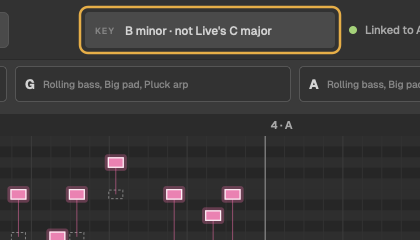
In harmony with lists the chord Reshape follows in each bar, and the clips it hears it in: the other MIDI clips in the same scene (row) of Session View, not counting drums.

If the clip plays alone, Reshape follows the chords in the clip's own low notes. If there's nothing to follow in a bar, it says nothing to follow there, and stays in key.
Best results: put a chord or pad clip in the same scene as the clip you're reshaping, with the same length.
What staying in harmony means
- On the beat, a lead plays notes of that bar's chord. Between beats it can pass through other notes of the key, by step.
- A bass stays on the chord's root and fifth on the beat.
- An arp plays only chord notes.
- A changed note never clashes with a note you're keeping.
The key
Reshape takes the key, in this order, from:
- the clip's own scale, if you've set one in Live 12;
- Live's scale for the set;
- the notes themselves.
The key box at the top says which, for example B minor · from the clip. If Live's scale doesn't fit the notes, Reshape sets it aside, takes the key from the notes, and says so: B minor · not Live's C major.