Tracks and roles
Arrange reads your set, gives each track a role, and the role decides which sections it plays in. You can change any of it.
Which tracks Arrange uses
Every track in your set that has a clip in Session View, audio or MIDI. Arrange copies that clip into the Arrangement, as many times as each section needs.
- Group tracks are left out: Arrange uses the tracks inside the group.
- Tracks with no Session clip are left out.
- Return and Main tracks are left as they are.
- Arrange's own tracks (named TT Arrange …) hold the extras, and aren't counted as part of your loop.
Arrange looks at your set every few seconds, so new tracks and clips appear by themselves. If you rename, add or remove tracks, your role changes and grid changes start again.
Which clip: the Scene menu
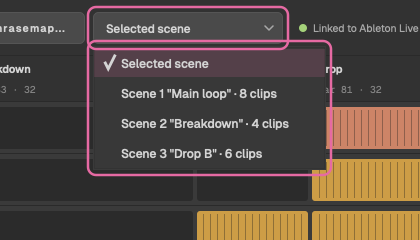
The Scene menu picks the row of Session View the clips come from. Selected scene follows the scene selected in Live. Or choose one, shown by number and name with how many clips it holds, for example Scene 2 "Main" · 6 clips, or empty.
A track with no clip in that row uses its first clip, from the top.
Roles
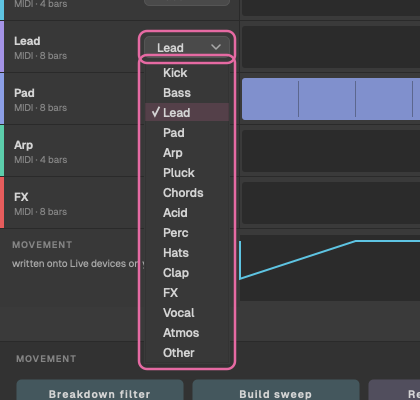
Each track gets one of fifteen roles, guessed from words in its name. The first match in this list wins, so a track called Bass Drum is a Kick. Short words, like bd or hh, only count as whole words.
| Role | Words in the name | Plays in |
|---|---|---|
| Kick | kick, bd, bass drum | Intro, Groove, Drop, Outro |
| Clap | clap, snare, sd | Groove, Drop, Outro |
| Hats | hat, hh, hihat, ride, cymbal, shaker, top | Intro, Groove, Build, Drop, Outro |
| Perc | perc, tom, conga, rim, drum, loop, groove | Intro, Groove, Build, Drop, Outro |
| Acid | acid, 303 | Groove, Drop |
| Bass | bass, sub, rumble, reese | Groove, Drop, Outro |
| Arp | arp, gate, sequence, seq | Groove, Breakdown, Build, Drop |
| Pluck | pluck, stab | Build, Drop |
| Lead | lead, melody, hook, riff, synth | Breakdown, Build, Drop |
| Chords | chord, keys, piano, supersaw, saw | Breakdown, Build, Drop |
| Pad | pad, string, choir, drone | Intro, Breakdown, Build, Drop |
| Vocal | vox, vocal, voice, acapella, spoken | Breakdown, Drop |
| FX | fx, riser, sweep, noise, impact, crash, uplifter, downlifter | Build |
| Atmos | atmos, ambience, ambient, texture, field | Intro, Breakdown, Outro |
| Other | anything else | Every section |
A track whose name doesn't say much, like Synth 3 (which reads as a Lead) or Audio 4 (Other), may need its role changing: click the role menu on its row and choose another. The grid follows the new role straight away.
Switching cells
Each cell is one track in one section. Click a cell to switch it on or off there: a lit cell plays, a dark one is silent. A small white dot marks a cell you've changed from the role's default; click it again to put it back.
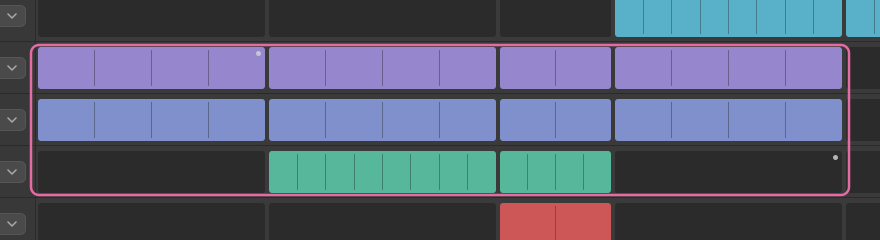
Inside a lit cell, the clip is copied back to back to fill the section. If the section isn't a whole number of loops, the last copy is cut short at the section's end.
Changing a track's role, choosing a new layout, or splitting, joining or removing a section puts its cells back to the defaults. Dragging an edge or renaming a section keeps them.