What's new in TranceTools Spark 1.0
A new main screen, Simple and Pro, leads with more feeling, a song timeline, FX, four sounds per part, a Vital preset pack and much more.
TranceTools Spark 1.0 is here. The app you knew as TranceTools now has a name of its own, Spark: it's the idea maker, alongside TranceTools Arrange for the arrangement and TranceTools Reshape for reworking a part. It's been a long road from the 0.9 beta, and almost every screen has changed: a new main screen, a Simple mode for when you just want ideas, leads with far more feeling, a song timeline with sections you can re-roll, an FX part, and every part linked to its own synth in your DAW from its lane. It goes on sale on Tuesday 1 December.
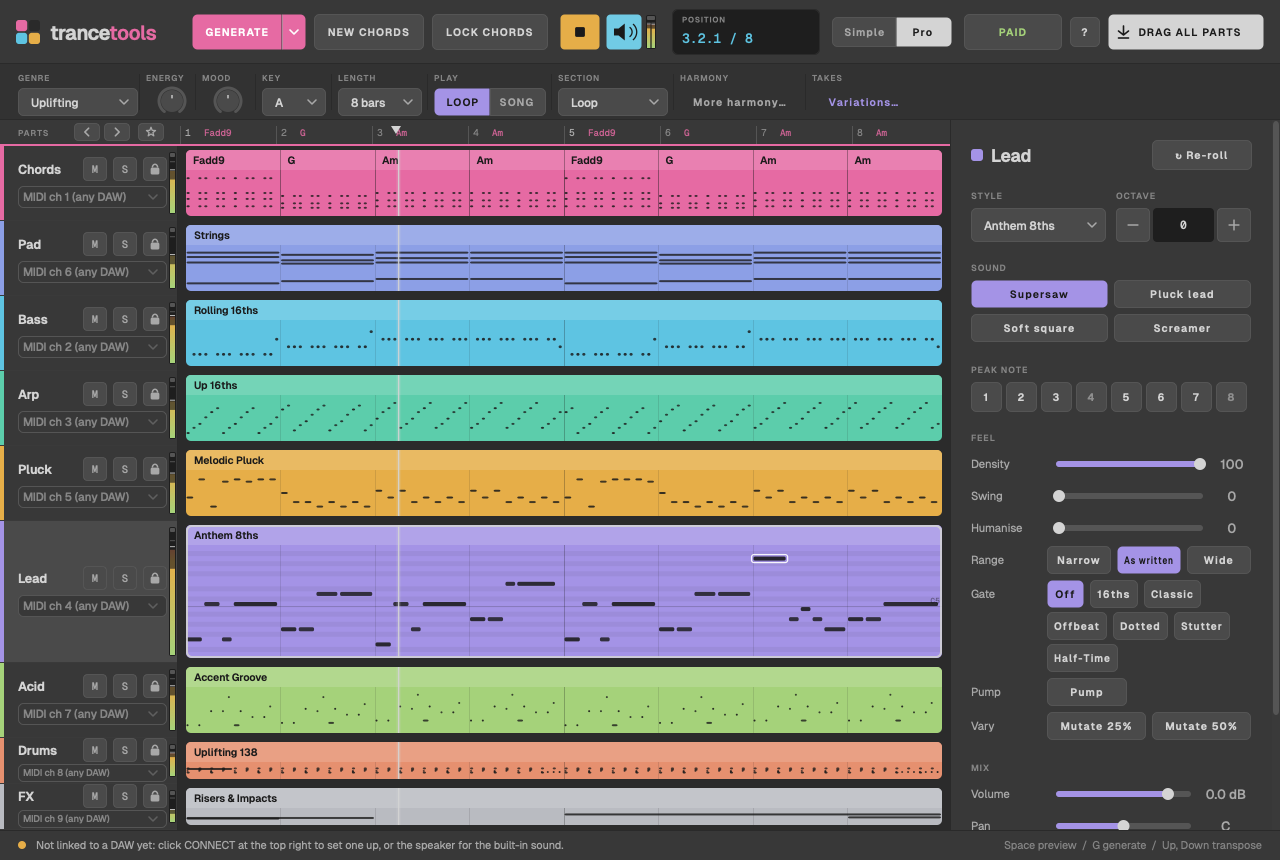
Your synths, part by part
TranceTools Spark is made to play the synths you've already chosen in your DAW, and 1.0 puts that up front. Under each part's name in its lane, in Simple and Pro, is where it plays: with the app linked to Ableton Live or Bitwig Studio, pick the track whose synth plays the part, and tracks named after a part are picked for you. As a plugin, or with any other DAW, the lane shows the part's MIDI channel, 1 to 9, ready to route to your synths.
The built-in sound is still there, now with four sounds per part (below), to preview an idea before your DAW is set up. It's a reference, not the point.
A new main screen
The whole window has a new Studio grey look: mid greys like a DAW, with softer part colours that don't glare. Each part now has a lane with a colour strip, its name, and mute, solo and lock buttons. Click a lane and its settings open in the inspector down the right: style, octave, re-roll, feel, sound, mix, where it plays and more. The top bar keeps the buttons you use all the time: Generate, New Chords, Lock Chords, Play and the built-in sound.
- Volume and pan per part, in the inspector's Mix section. They shape the built-in sound and audio exports, and leave your MIDI alone.
- Zoom the whole window from 75% to 200% (View > Zoom). The app reopens at the size and zoom you left it.
Simple and Pro
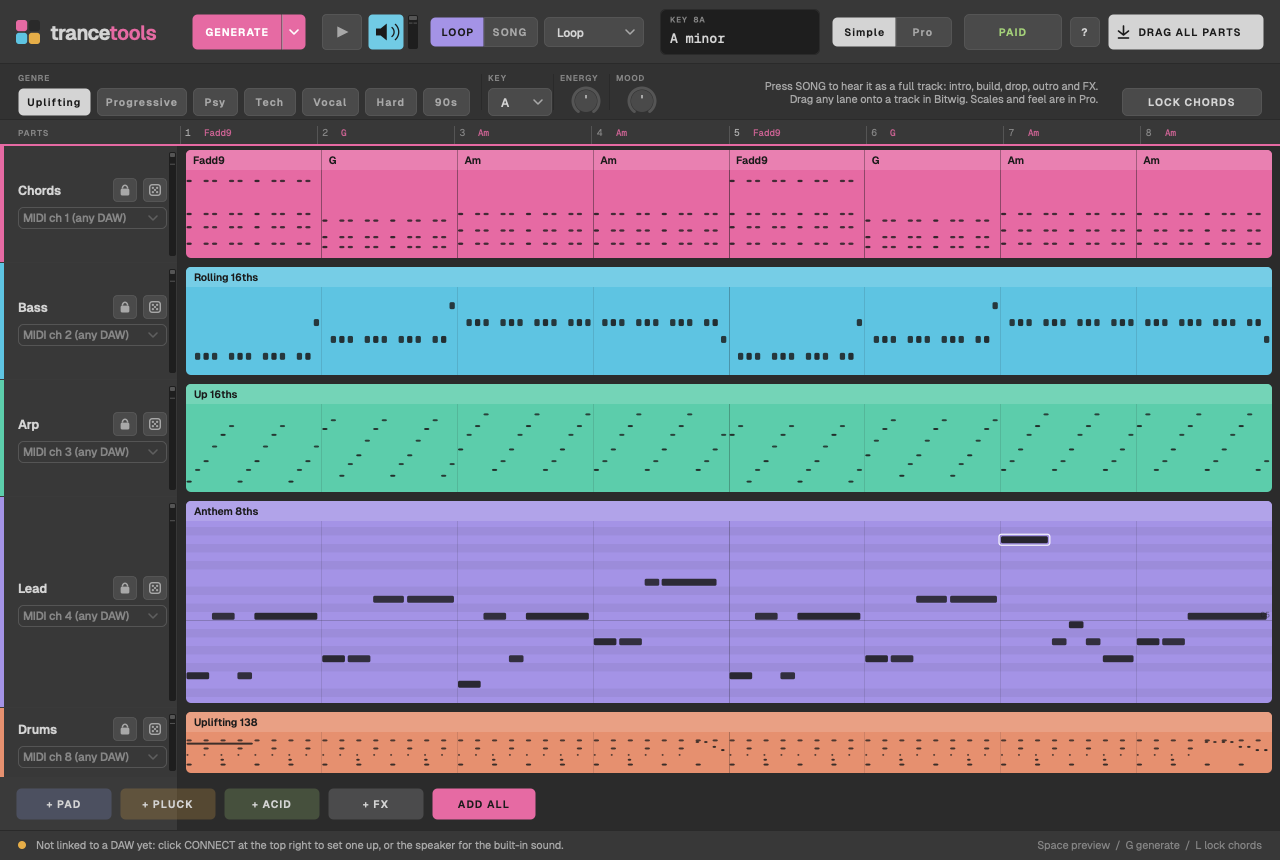
Simple shows what you need to get ideas fast: Generate, genre chips, key, Energy, Mood, Lock Chords and Drag All, with a lane per part and its re-roll and lock buttons. Pro is the full editor, with every control and the inspector.
New users start in Simple. If you used the beta, you'll stay in Pro. Switch any time with the Simple and Pro buttons in the top bar, or View > Simple / Pro.
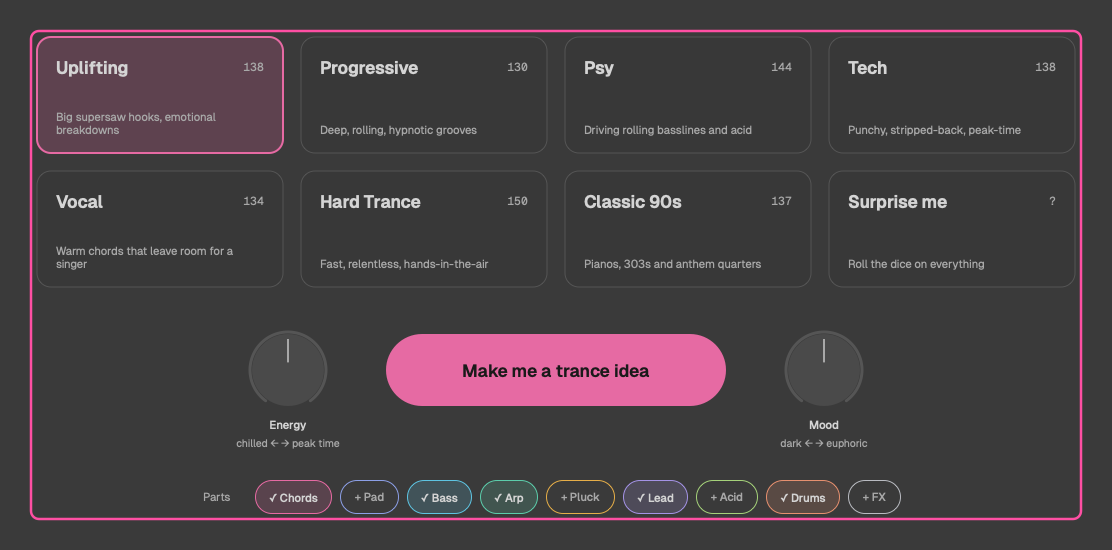
Start with Generate
The app now opens on a launch screen that asks "What are we making tonight?" Pick one of the seven genres or Surprise me, set Energy and Mood, choose which parts you want (Lead, Chords, Bass, Arp and Drums to start with) and click Make me a trance idea. It writes the idea and starts playing it.
Then keep rolling. Generate (G) writes new parts and keeps your settings. The ▾ beside it adds Generate everything (⇧G), which rolls a new key, chords, Energy and Mood in the same genre, and Surprise me, which picks the genre too. Locked parts and locked chords always stay as they are.
From the same screen you can choose where you'll hear it (your DAW, or the built-in sound for reference), open your saved ideas, or skip straight to the full editor. File > Start Screen brings it back.
Energy and Mood
Two knobs, next to the genre. Energy goes from sparse to busy: the bass, arp and acid fill out, chords gate harder and the drums gain open hats and fills. Mood goes from dark to euphoric: it picks progressions that lean that way, adds colour to the chords as it brightens, and moves the lead's register. Turn one and the idea reshapes when you let go. Locked parts stay as they are, and you can undo it.
Leads with more feeling
The lead has been rewritten from the ground up. Instead of a busy line that wandered from chord to chord, it's now a riff: a few notes a bar, offbeats and notes tied over the beat, repeats and leaps of a 4th, 5th or octave, and room to breathe every couple of bars. The riff comes back almost unchanged, bending only the notes that no longer fit the chord, and the line climbs by a leap to one high note.
The drop plays the riff, then a second half that lifts it higher, so the drop builds instead of repeating.
There's a new lead style too: Euphoric, the stacked lead of big uplifting trance. Every note is a 16th, in three layers over each chord: the root bouncing between octaves, an anchor on the 5th crossing against the beat, and a hook that pulses on a chord tone and climbs to one peak. Pair it with the new Sub Pad, which holds each chord's root low underneath. How Euphoric is built.
16-bar ideas now tell a story instead of playing 8 bars twice: the second half opens the same way, then develops through new chords and turns for home.
More emotion, genre by genre
All seven genres now write parts that belong together, and their song sections behave like the real thing:
- Parts that belong together. Every genre rolls from its own curated recipes, with its own progressions and tempo. Uplifting gets a rolling or galloping bass, gated or pumping supersaw chords and the anthem lead; Psy a rolling bass, acid and a drone; Classic 90s offbeat stabs, plucky arps and a gated pad over a 909. Parts a genre doesn't need, such as Acid in Uplifting, are left out to start with; add them if you want them.
- Harmony with a reason. Each genre writes chords the way its style does: Uplifting's i–VI–III–VII and borrowed major V, Psy holding the tonic in Phrygian with a ♭II for tension, Hard Trance's harmonic-minor pull to a major V, Vocal's two bars a chord to leave room for a singer. How each genre writes its notes.
- Colour where it counts. A new chord colour, Lift, keeps the chords plain and adds a 9th only to the chords that lift the progression.
- A real breakdown: the chords at half speed, voiced wide, a pad swelling in, the riff stated softly and then in full an octave up.
- A real build: a snare roll speeding up to 32nds, a riser, a climbing fragment of the riff, and a silent beat before the drop.
- A drop with life: accents like a player's, ghost notes on the hats, a fill into every phrase, and in the second half the lead doubled an octave up, off-beat chord stabs and a tambourine.
- A song that breathes: parts come in filtered and open up, the breakdown rings into the reverb, and the filters snap open on the drop.
Loop and Song
A LOOP / SONG switch is now in both modes. Song plays your idea as a whole track: intro, breakdown, build, drop and outro, with the FX. In Simple, Hear As lets you play one section on its own.
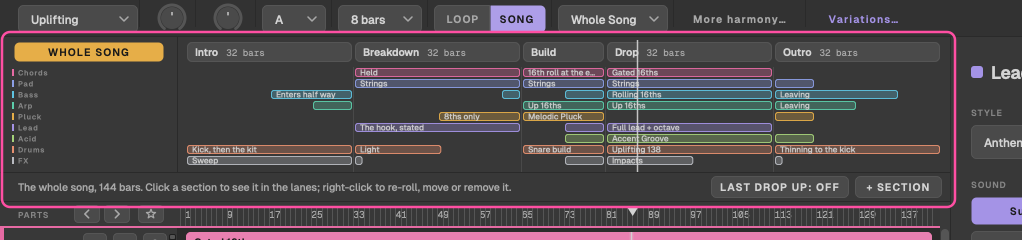
Songs are DJ length. An Uplifting song runs a 32-bar intro, 32-bar breakdown, 16-bar build, 32-bar drop and 32-bar outro: 144 bars, from any loop. Each genre has its own lengths: Progressive's build is 32 bars, Psy's drop rolls on for 64, and Hard Trance and Classic 90s build in just 8. Something changes every 8 bars: the intro brings in the kit, then the bass, then the arp, a phrase at a time, with a fill marking each change, and the outro takes them away again. The manual has every genre's lengths.
The song timeline
In Song, a timeline sits over the lanes: a strip of sections, and a row per part showing where it plays. Click a section to show just that section in the lanes while the whole song keeps playing. Re-roll gives a section a new take, with a fresh lead, arp, pluck, acid, bass and drums over the same chords. In Pro you can move, duplicate, insert and remove sections, and Last drop up lifts the final drop a key for that classic last-chorus moment.
FX, a ninth part
The new FX part plays risers of 1, 2, 4 or 8 bars, impacts, downlifters, a reverse cymbal and long sweeps. It's always in the Song, placed where each section needs it, and you can add it to the loop with + FX. It's sent on MIDI channel 9, and the Bitwig and Live scripts route it like the other parts.
A better reference sound
The built-in sound, for previewing before your DAW's set up, now has four choices per part, in the inspector's Sound row:
| Part | Sounds |
|---|---|
| Lead | Supersaw, Pluck lead, Soft square, Screamer |
| Chords | Supersaw, Stab, Piano, Organ |
| Pad | Warm, Strings, Choir, Glass |
| Bass | Saw, Sub, Reese, Pluck |
| Arp | Pluck, Bell, Saw, FM |
| Pluck | Classic, Marimba, Pizz, Harp |
| Acid | 303, Squelch, Rubber, Distorted |
| Drums (kits) | 909, 808, Hard, Psy |
If a part is playing on a synth in your DAW, its Sound chips dim and tell you so, so you're never left wondering why nothing changed.
Chord voicing
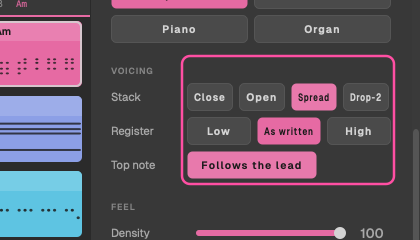
The Chords part has a Voicing section: Close, Open, Spread or Drop-2, a register (Low, As written, High), and Follows the lead, which turns each chord so its top note sits just under the melody. Like Feel, voicing never re-rolls the notes; it only moves them by octaves.
Find your ideas again
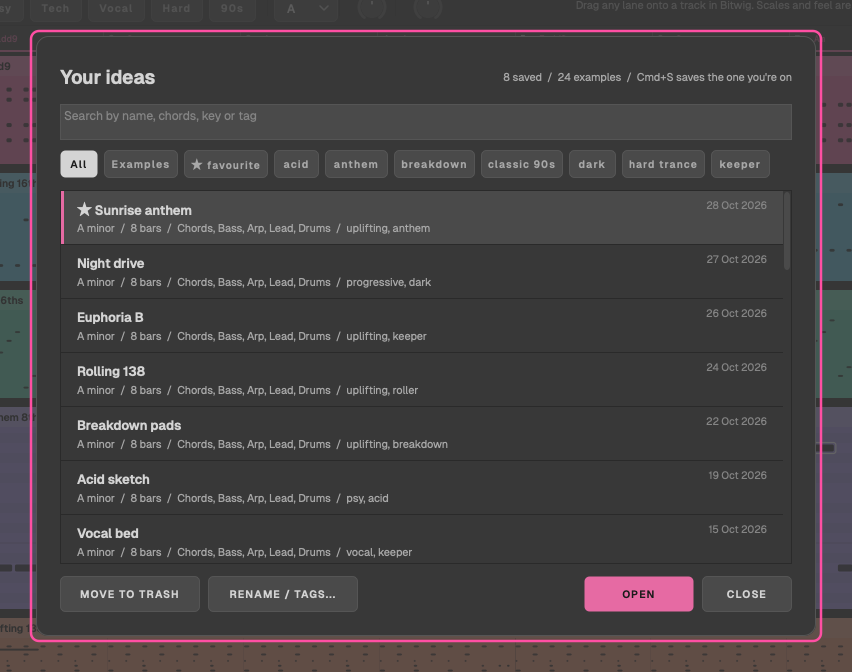
File > Save Idea (⌘S) saves the idea with a name and tags. File > Open Idea (⌘O) lists them newest first: search by name, chords, key or tag, then open, rename, retag or bin one. Your beta favourites come across as saved ideas tagged "favourite", names and dates included. A saved idea now keeps its Song too: the arrangement and the last drop's lift.
24 example ideas come built in, three or more in every genre, from Paper Dawn to Sunday Warehouse. Open one to hear what TranceTools Spark can do, change anything, and ⌘S saves your own copy.
Liked the bassline three ideas ago? Right-click a lane and choose Use Bass From… to bring it back, moved to the current key and chords.
The variation grid
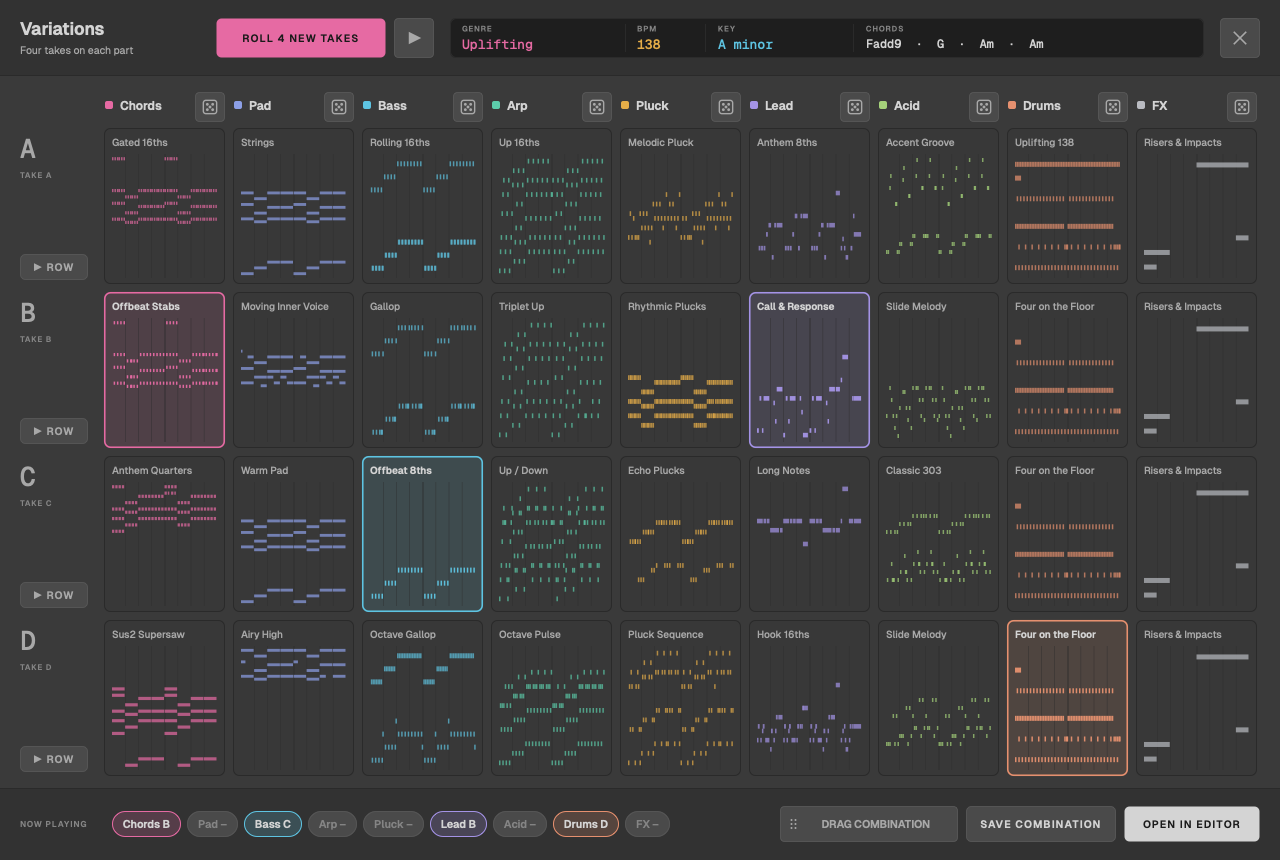
View > Variations (Pro) shows four takes of every part side by side. Pick a take for each part, hear the combination (switches wait for the next bar, so it never stumbles), then open it in the editor or drag it straight into your DAW.
Better exports
- Clips that say what they are. A dragged clip is named like TT Lead · Drop · Am · 138: the part, the section, the key and the tempo. Sharp keys now keep their sharp in file names.
- A quick WAV of the song, for reference. File > Export Song as WAV renders the whole arrangement through the built-in sound, for a reference or a quick bounce to share: every section, its takes, the last-drop lift and the FX. Choose 48 or 44.1 kHz, 24-bit, the mix alone or the mix with a stem per part. It renders in the background with a progress bar.
A free Vital preset pack
TranceTools Spark 1.0 comes with 32 presets for Vital, the free synth: one made for each built-in sound, plus a gated supersaw and three FX. Every preset has the same four macros: Cutoff, Resonance, Width and Space. File > Install Vital Presets copies them into Vital's presets folder after asking you first, and each Sound chip's tooltip names the preset that matches it.
Choose where the built-in sound plays
View > Audio Output picks the device the built-in sound plays on: your interface, headphones or speakers, with sample rate and buffer size. Until you choose, it follows your Mac's default output. Right-click the speaker button for a shortcut.
Smaller things
- Undo and Redo (⌘Z and ⇧⌘Z) bring back every kind of change: styles, feel, voicing, sounds, volume and pan, octaves, locks and the Song's arrangement.
- New shortcuts: G generates and L locks the chords.
- GarageBand: the AU now loads without the "Lower Security Settings" prompt, and sees the same licence and ideas as the app.
- Opt-in crash reports. If the app ever closes unexpectedly, it asks next time whether to send a report. Nothing is sent unless you say yes, and personal details like your name and licence key are stripped out first. Change your mind in Help > Crash Reports.
- Steadier plugin playback: notes pick up correctly when your DAW starts mid-bar or loops, with no stuck notes.
- A playhead and level meters. A playhead runs across the lanes, each lane has a level meter, the output has one by the speaker, and the readout shows the play position.
- Help on screen: press ? for a labelled map of the window, plus one-time tips the first time you use Song, re-roll, lock or drag.
- Clearer messages when something goes wrong, each with what to do next. A saved idea or a settings file that won't read is kept aside, never lost.
- A built-in sound that breathes: a sidechain pump keyed to the kick, filters and reverb that move, and brighter notes when played harder.
Upgrading from the beta
Install 1.0 over the beta. Your saved state and favourites come across, and you'll stay in Pro mode.
The beta has closed, and beta keys don't work in 1.0: activating one says The beta has ended. Thanks for testing! Without a key, 1.0 runs in Preview mode, so you can still generate ideas and hear them. Dragging into your DAW and exporting need a licence, which goes on sale on Tuesday 1 December.
When you can buy it
TranceTools Spark 1.0 goes on sale on Tuesday 1 December. It runs on macOS 11 or later, on Apple silicon or Intel, as an app and as a VST3 and AU plugin. There's no Windows version yet.
New to it? Start with Getting started, then keep the TranceTools docs handy for everything else.