A lead that's nearly right? Turn the dial.
TranceTools Reshape rewrites the notes of a lead, bass or arp clip in Ableton Live with one dial, from new phrase endings up to a whole new line. Every change stays in key and fits the chords in your other clips. You hear it from the next bar while the clip plays, and Cmd+Z in Live undoes it.
- Ableton Live 12 or later
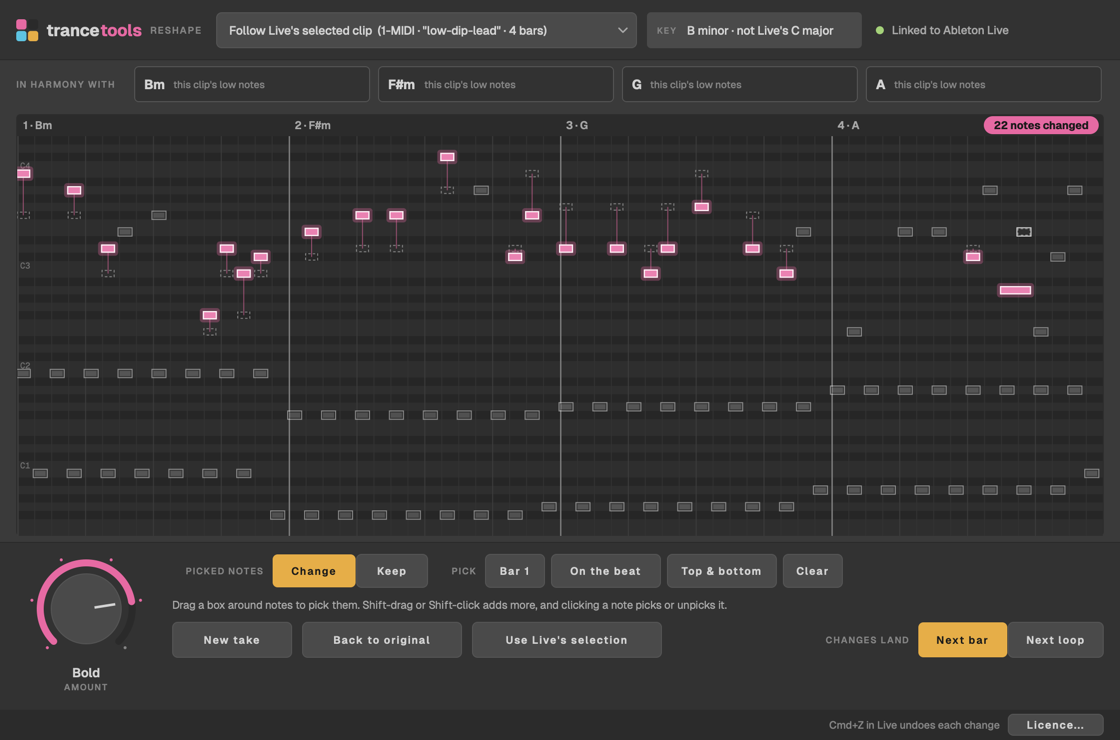
From a touch to a rewrite
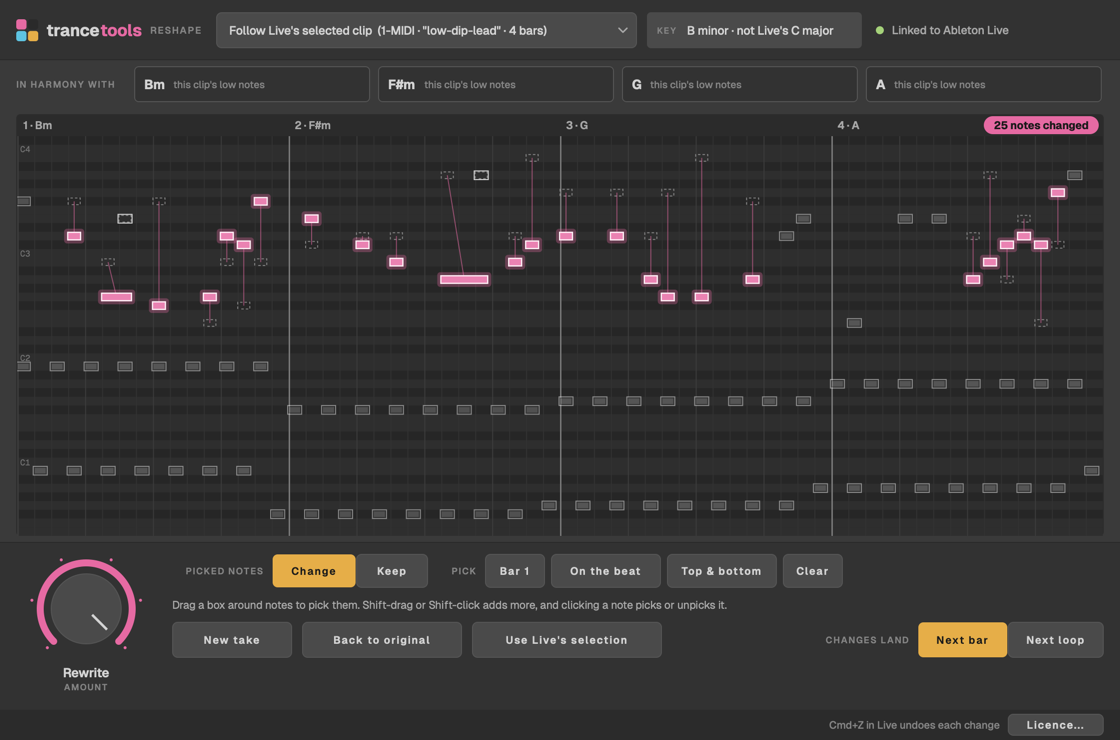
Reshape hears your clip as phrases: a statement, an answer, a development and an ending. Each step of the dial changes more of them.
- Subtle: the phrase endings.
- Gentle: the answers and the endings.
- Noticeable: everything but the opening statement.
- Bold: everything, with the motif turned upside down or moved.
- Rewrite: a whole new line, from a fresh motif.
Not quite it? New take gives you another version at the same step, and Back to original puts the clip's own notes back.
Written like a melody, not rolled like dice
Reshape follows the chords in the other clips in the same scene, so every change fits what's under it. If the clip plays alone, it follows the chords in the clip's own low notes. It takes the key from Live's scale, or from the notes when Live's scale doesn't fit.
- The line keeps its shape: it moves mostly in steps, steps back after a leap, and ends each phrase on a chord note.
- A changed phrase comes back changed the same way, so a hook still sounds like a hook.
- Basses stay on the root and fifth on the beat, and arps keep their pattern, every note a chord note.
- Layers under a melody, like root bounces and held notes, stay as they are.
- From Noticeable up, a lead can gain or lose a note, on the grid your clip already uses. Velocities aren't touched, and nothing is randomly nudged off the grid.
Pick the notes that change, or the ones that stay
Pick some notes, then choose Change to reshape only those, or Keep to hold them while the rest changes. Drag a box around notes, click a bar number, or use Bar 1, On the beat, Top & bottom, or the notes you've selected in Live's own note editor.
Changed notes show in pink, with a line back to where each one was, and Reshape counts how many changed.
Three steps
- Link it to Live. Click Install the Live script in the app and restart Live. Then, in Live's Settings › Tempo & MIDI, choose TranceToolsReshape as a Control Surface.
- Pick a clip. Click a lead, bass or arp clip in Live's Session View, and Reshape follows it. Or choose a clip in the app.
- Turn the dial. Let go and the change goes to Live, heard from the next bar, or from the top of the loop if you'd rather the whole loop changes at once. Cmd+Z in Live undoes each change.
Good to know
Anything else? Email hello@trancetools.com, or ask on the TranceTools Discord.
When can I get it?
TranceTools Reshape is out on Tuesday 1 December, the same day as TranceTools Spark 1.0. Leave your email above and we'll tell you when you can download it.
Which versions of Live does it work with?
Ableton Live 12 or later, on a Mac with macOS 11 or later (Apple silicon or Intel). It links to Live with a Live script, so you don't need Max for Live.
What kind of clips can it reshape?
MIDI clips in Session View with a lead, a bassline or an arp in them. Reshape works out which from the track's name and the notes, and treats each one differently: a lead gets a new line, a bass stays on its roots, and an arp keeps its pattern.
Will it change my clip for good?
Only if you keep the change. Cmd+Z in Live undoes each one, and Back to original puts back the notes the clip had when Reshape first read it.
Is it random?
No. Each version is composed to fit the chords and the line's shape, and the same step and take always give the same notes. New take gives you a different one.
Can I try it before buying?
Yes. When it's out on 1 December, you can download it and try everything in the app's window without a licence: turn the dial, pick notes and try takes on your own clips. A licence lets Reshape send the changes to Live.
I own TranceTools Spark and Arrange. Is there a discount?
Yes: Reshape will be £20 for you. When it's out, enter one of your product keys at checkout and it opens at £20. A TranceTools Spark + Arrange bundle counts, and so do both apps bought separately with the same email.
How many Macs can I use it on?
Two per key. To move to another Mac, click Licensed at the bottom of the window and choose Deactivate this Mac.
TranceTools Reshape is out on 1 December
£29 one-off, for Ableton Live 12 on a Mac.
Email me when it's outAbleton and Live are trademarks of Ableton AG. TranceTools isn't made, sponsored or supported by Ableton.