The TranceTools Mac app: beta coming very soon
The idea generator is coming to the Mac as a native app that works right alongside your DAW, starting with Bitwig Studio.
The Studio is great for sparking an idea in your browser, but sooner or later you have to get it into your DAW and onto your own sounds. The TranceTools Mac app closes that gap. It's the same kind of idea generator, as a native macOS app that sits next to your DAW and talks to it. The first DAW it supports is Bitwig Studio.
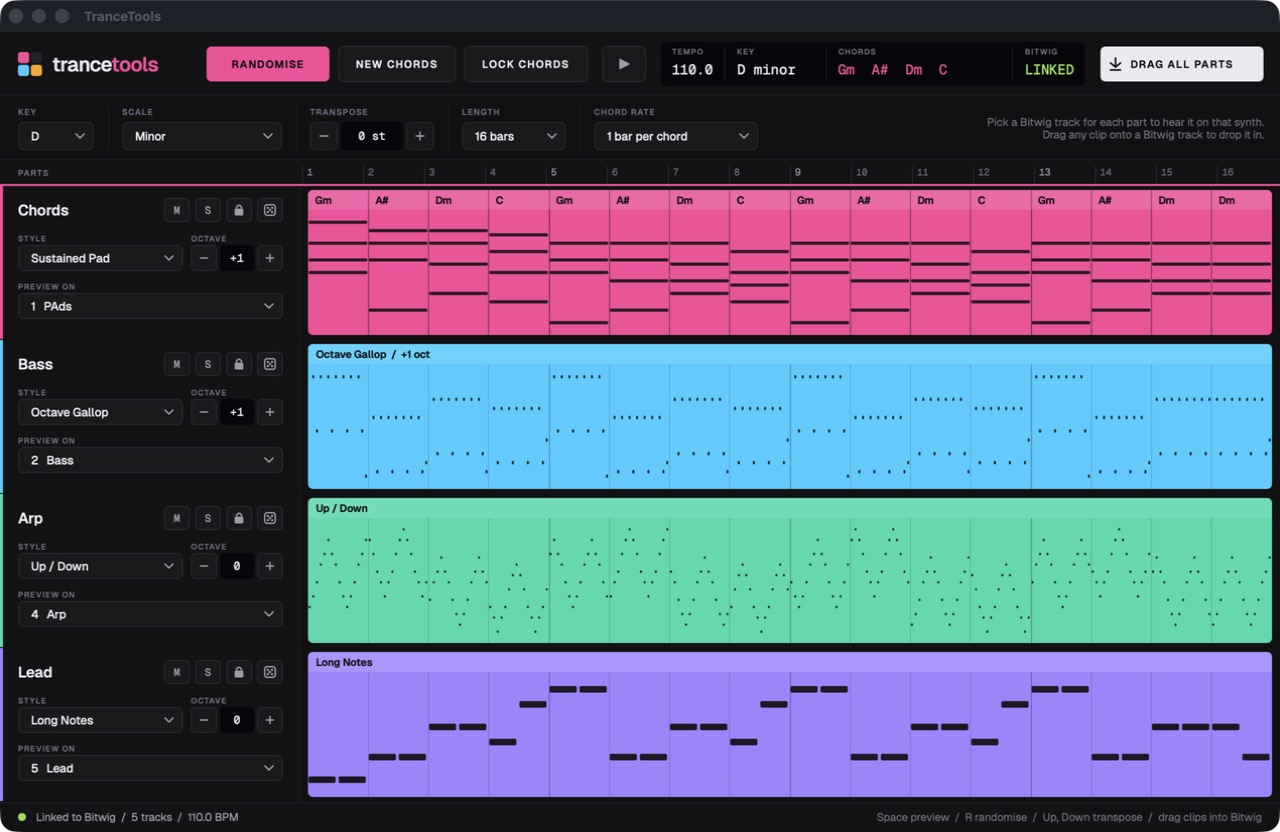
Four parts, one click
Every idea has four parts: Chords, Bass, Arp and Lead. Set the key and scale, a length of 4, 8 or 16 bars, and one or two bars per chord.
- Randomise rolls a whole new idea, and New chords changes just the progression.
- Each part has its own dice to re-roll it, a lock to keep it when you randomise, and mute and solo.
- Each part also has a choice of styles:
- Chords: Sustained Pad, Offbeat Stabs, Gated 16ths and Sus2 Supersaw.
- Bass: Offbeat 8ths, Rolling 16ths, Octave Gallop and Sustained Sub.
- Arp: Up 16ths, Up/Down, Trance Gate and Random Tones.
- Lead: Anthem 8ths, Syncopated, Long Notes and Call & Response.
The writing follows the same ideas as the new Spark. Leads are built from a repeating motif that follows the chords and resolves at the end of the loop. Basslines lock to one groove on the chord roots, with passing notes in key leading into each chord change.
Hear it on your own synths
This is the big one. Each part has a Preview on menu listing your Bitwig tracks, so the chords can play on your Sylenth1 pad, the bass on your bass track and the lead on Serum. You hear the idea on the sounds you'll actually use, not a stand-in.
A small Bitwig controller script links the two. The app stays outside Bitwig, so nothing goes in your device chain.
Drag it straight into Bitwig
When you like a part, drag its clip onto a Bitwig track or clip slot and it drops in as a plain MIDI clip. There's no plugin to keep loaded. Drag all parts drops all four at once.
Built for working fast
- Transpose without losing the idea. Changing the key moves the current idea rather than writing a new one. The ± buttons step a semitone at a time, and each part has its own octave control.
- Follows Bitwig's tempo. The status bar shows whether it's linked.
- Keyboard shortcuts: Space to preview, R to randomise, and the up and down arrows to transpose.
When can I try it?
The beta is coming very soon. It's Mac only for now, with Bitwig Studio as the first supported DAW. We'll announce it here on the News page the moment it opens, so check back or follow the RSS feed.
In the meantime, the Studio is free in your browser, and it exports MIDI for any DAW.